
If you applied and Apna Khet Apna Rozgar Status Check and have no idea what happened to your application, you are not alone. Thousands of landless farmers and rural youth across Punjab are searching for the same answer right now.
In this complete guide, you will learn exactly how to check your application status online by CNIC, how to login to the official AKAR portal and how to download your application slip. We have also covered required documents, common portal problems, and fraud warnings. Everything you need is right here.
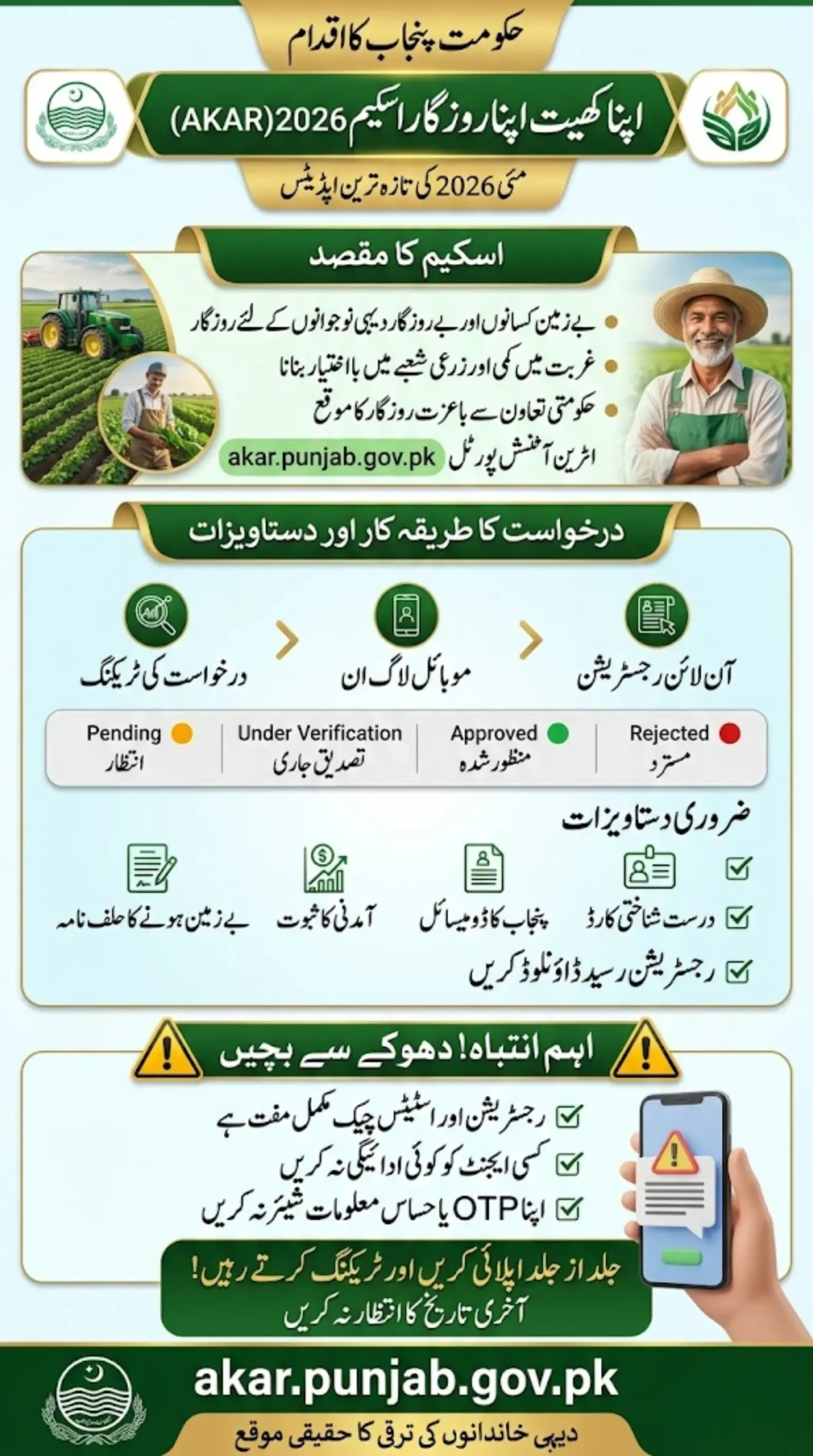
Breaking Update: Status Tracking System Expected
A digital tracking system is being introduced where applicants can check everything in real time. No more guessing, no more waiting without updates.
Through the system, users may soon see:
- Application received confirmation
- Verification progress
- Approval or rejection status
- Final selection updates
For many applicants, this brings relief after weeks of uncertainty.
Also Read: Apna Ghar Housing Scheme 2026 Login – How to Register & Apply Online (Full Guide 2026)
Quick Info – Apna Khet Apna Rozgar Status Check
| Detail | Information |
|---|---|
| Scheme Name | Apna Khet Apna Rozgar Scheme 2026 |
| Also Known As | AKAR Scheme |
| Launched By | CM Punjab Government |
| Target Group | Landless Farmers, Rural Youth |
| Official Portal | akar.punjab.gov.pk |
| Status Check Method | CNIC or Application ID |
| Documents Needed | CNIC, Domicile, Income Proof, Affidavit |
| Application Fee | Free |
| Mobile Friendly | Yes |
| Fraud Warning | Use Official Sources Only |
What Is the Apna Khet Apna Rozgar Scheme?
At its core, this is an agriculture support and self-employment initiative by the Punjab government aimed at people who want to work the land but do not have land of their own.
The scheme is designed to give landless citizens and unemployed rural youth a real shot at farming-based income, without needing to own property first. It is a poverty reduction effort wrapped inside an agricultural empowerment program.
If officially launched at full scale, it is expected to support citizens through:
- Agricultural land access and support
- Rural self-employment opportunities
- Crop production assistance
- Financial inclusion for low-income families
- Youth empowerment through farming
- Reduction of rural poverty across Punjab
This is why hundreds of thousands of people are actively searching for registration, login, and status updates every single day.
Also Read: Rehmat Card Apply Online Web Portal Registration & Eligibility Details – Know Full Details 2026
Why Checking Your Application Status Matters
You submitted your form, now what? That uncertainty is the hardest part. Many applicants do not know if their application was received properly, if documents are missing, or if they have already been approved or rejected without even knowing.
Regular status checking helps you:
- Confirm your application was successfully submitted
- Track the verification progress step by step
- Find out if any documents are missing before it is too late
- Know your approval or rejection result early
- Prepare for the next stage of the process
- Stay away from fake rumors and misinformation
Do not rely on WhatsApp forwards or Facebook pages for updates. Check the official portal yourself.
How to Check Application Status Online — Step by Step
Once the official portal is active, here is exactly how to track your application:
Step 1 — Visit the Official Portal Go to akar.punjab.gov.pk or the Punjab Agriculture Department website directly.
Step 2 — Find the Status Section Look for any of these options on the homepage:
- Check Status
- Track Application
- Applicant Dashboard
- Registration Status
Step 3 — Enter Your Details You may need to provide:
- Your CNIC number
- Your Application ID
- Your registered mobile number
Step 4 — Submit and View Result After clicking Submit, your current status will appear on the screen.
Read More: Breaking News: BISP 8171 May Installment Release Date & New Updates Revealed
What Does Each Status Actually Mean?
- This is where most people get confused. Here is a plain explanation of every possible status:
- Pending: Your form was received but has not been reviewed yet. Be patient.
- Under Verification: Your details are actively being checked against government records.
- Approved: You passed verification. Wait for the next stage instructions.
- Rejected: There is an issue with your eligibility or submitted information.
- Waitlisted: The quota for your area is full but you are in the waiting list.
- Incomplete: Something is missing, a document or a detail in your form needs to be completed.
How to Login to Your AKAR Portal Account
After registration, you can log back into your account anytime. The login process is simple:
- Visit the official portal
- Click on Login
- Enter your CNIC number and password
- Complete the OTP verification from your registered mobile
- Enter the Captcha if required
- Your dashboard will open
From your dashboard you can check status, upload missing documents, download your slip, update your profile, and read any new government notices related to your application.
Always keep your login credentials safe and never share your OTP with anyone.
How to Download Your Application Slip or Status Proof
Many applicants need a physical or digital copy of their submission for future reference. Here is how to download it:
- Log in to your dashboard
- Open your Application Details section
- Click the Download button
- Save the PDF to your phone or computer
- Print a copy if needed for verification purposes
You may be able to download:
- Registration receipt
- Submitted application form copy
- Current status slip
- Verification confirmation
- Approval notice when issued
Keep this document safe — you may need it at later stages of the process.
Also Read: Today Update 2026: Kisan Card Payment Delay Reason Revealed – Know Full Details
AKAR Scheme Online Registration Process
For those who have not yet applied, here is how the registration is expected to work:
- Create a new account on the portal
- Enter your CNIC number
- Verify through mobile OTP
- Fill in your personal and family details
- Add your district and tehsil
- Upload required documents
- Submit the application
- Receive your tracking number
The application form will ask for details including your full name, father’s name, address, income status, land ownership status, number of family members, education, and any farming experience you have.
Fill everything carefully. Wrong or incomplete information is the number one reason applications get delayed or rejected.
Documents Required for a Successful Application
Having these ready before you start will save you a lot of trouble:
- Valid CNIC
- Punjab domicile certificate
- Recent passport size photographs
- Family registration certificate
- Income proof documents
- Affidavit confirming landless status
- Recent utility bill copy
Missing even one of these can stop your application from moving forward. Prepare everything in advance.
Common Problems and How to Fix Them
- CNIC Not Found: Your application may not have synced yet. Wait a few hours and try again. Double check you are entering the correct CNIC format.
- OTP Not Received: Check that your registered mobile number is correct and the SIM is active. Try again after a few minutes.
- Login Error: Use Chrome browser, clear your cache, and try again. If the password is wrong, use the reset option.
- Status Not Changing: Verification takes time, sometimes days or even weeks. Do not panic if the status stays the same for a while.
- Website Running Slow: This usually happens during peak hours when many people are using the portal at the same time. Try early morning or late night.
Also Read: Latest Update Today: Rehmat Card Mobile App Widow Registration Process Explained 2026
Important Warning — Avoid Fraud at All Costs
Every time a new government scheme launches, scammers come out in full force. Protect yourself:
- Never pay any agent who promises guaranteed approval
- Never share your OTP with anyone, not even someone claiming to be from the government
- Do not send your CNIC to unknown WhatsApp numbers or groups
- Avoid unofficial websites that look similar to the real portal
- Do not trust fake Facebook pages or YouTube channels claiming inside information
The official portal is free. Registration is free. Status checking is free. If someone is asking for money, they are lying.
Apply Early — Do Not Wait for the Last Date
When the official last date is announced, avoid waiting until the final days. Last-minute rush causes:
- Portal slowdowns due to heavy traffic
- OTP delays from network congestion
- Upload errors under pressure
- Risk of missing the deadline entirely
Apply as early as possible and keep checking your status regularly after submission.
Frequently Asked Questions
How do I check my application status?
Visit the official portal, enter your CNIC or Application ID, and click Submit to view your current status.
Can I check status using just my CNIC?
Yes, the portal is expected to support CNIC-based tracking without needing an application ID.
Can I apply from my mobile phone?
Yes, the portal is expected to be mobile-friendly and accessible from any smartphone.
What is the last date to apply?
The official last date has not been confirmed yet. Monitor the official portal for announcements.
Can I edit my form after submitting?
Some portals allow corrections before the deadline. Check your dashboard for an edit option.
What happens after my status shows Approved?
You will move to the district quota review and merit ranking stage. Keep checking the portal for further instructions.
Final Thoughts
The Apna Khet Apna Rozgar Scheme 2026 is a genuine opportunity for rural families and landless farmers who have been waiting for exactly this kind of support. But the opportunity only works if you engage with it correctly, through official channels, with accurate documents, and with regular follow-up on your application status.
Keep your CNIC, mobile number, and Application ID ready at all times. Log in to your dashboard regularly. Download your slip. And ignore anything that is not coming directly from the government portal. This scheme could change things for a lot of families. Make sure yours is one of them.