

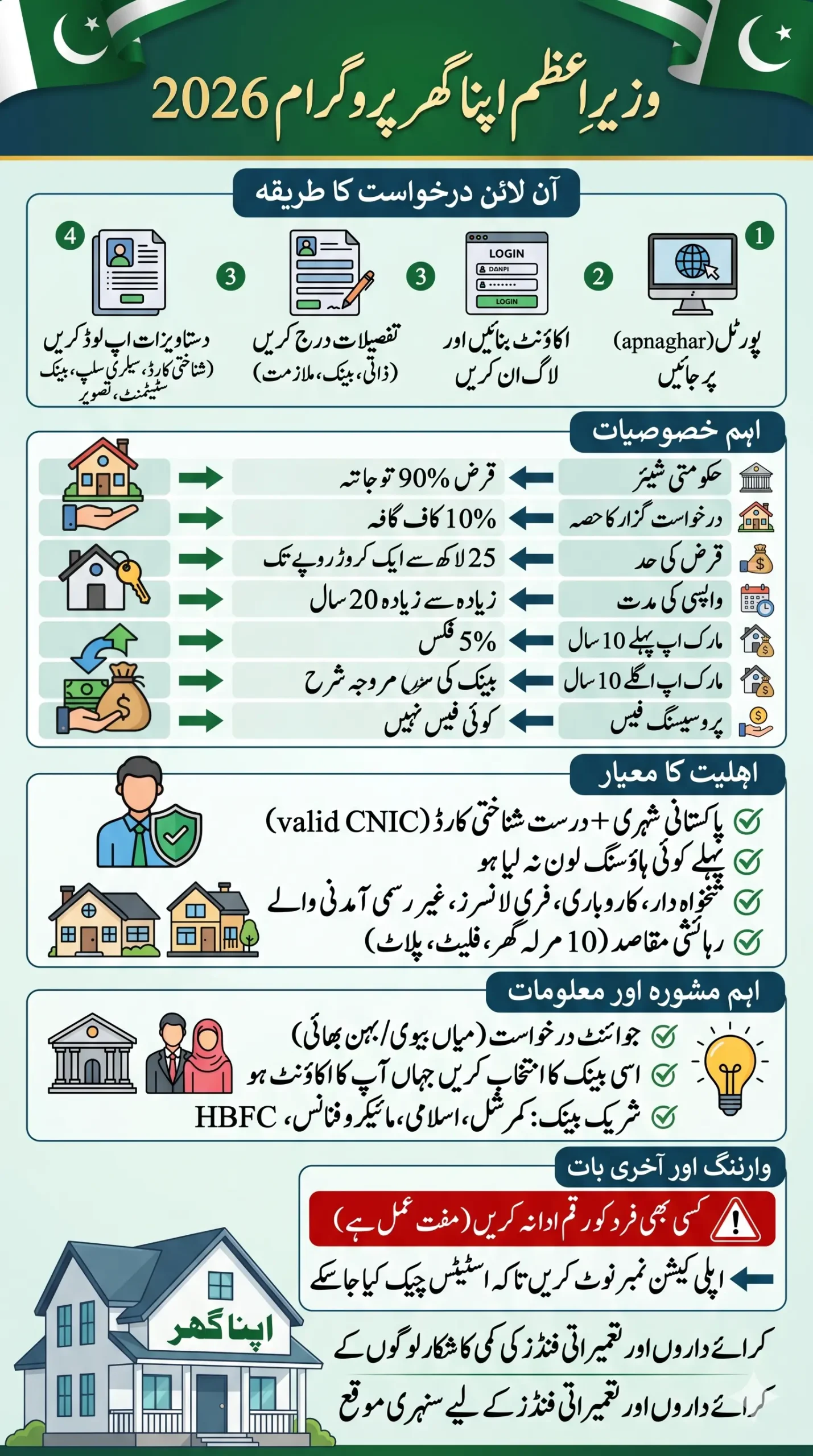
Good news for every Pakistani family dreaming of their own home. The PM Apna Ghar Program Online Apply 2026 is now officially open. You can apply right now at apnaghar.gov.pk in just a few simple steps. This scheme offers loans from 25 lakh to 1 crore, with only 5% markup for the first 10 years and zero processing fees.
Whether you are salaried, a business owner, or a freelancer, you can apply. The government covers 90% of the financing and you only need 10% yourself. In this article, we will walk you through the complete step-by-step online application process, from account creation to final submission.
If the form is not loading, click below:
Apply via Registration PortalWhat is PM Apna Ghar Program Online Apply
The Prime Minister Apna Ghar Program is a subsidized housing loan scheme where the government provides up to 90% of the financing so you can build or buy a home, and that too at only 5% markup for the first 10 years. On top of that, there is no processing fee and no prepayment penalty whatsoever.
This scheme is designed for families living on rent, people staying in their parents’ home, or those who have land but no money for construction. In one word, this is for Pakistan’s middle class. It is also the updated version of what was earlier known as the Mera Ghar Mera Ashiana scheme, with improved conditions and broader eligibility for 2026.
Quick Info – PM Apna Ghar Program Online Apply
| Detail | Information |
|---|---|
| Official Website | apnaghar.gov.pk |
| Loan Range | 25 Lakh – 1 Crore (PKR) |
| Loan Tenure | Maximum 20 Years |
| Markup Rate (First 10 Years) | 5% Fixed |
| Markup Rate (Next 10 Years) | Prevailing Bank Rate |
| Your Minimum Contribution | 10% of Total Amount |
| Government Share | Up to 90% |
| Eligible Banks | Commercial, Islamic, Microfinance, HBFC |
Know Full Eligibility Criteria
Before you fill out anything, check whether you actually qualify. Many people apply and then get rejected later, so read this carefully first:
- You must be a Pakistani citizen with a valid CNIC
- You should not have taken any housing loan before from any scheme
- Salaried employees, business owners, and freelancers or informal workers, all three are eligible
- You must arrange at least 10% of the total amount yourself
- The loan is only for residential use, not for commercial property
- A co-applicant is allowed, such as a spouse or sibling
- Property must be a residential house up to 10 marla, a plot for construction, or a flat
Warning: If anyone asks you for money to submit your form or help you select a bank, do not pay. The official rules clearly state zero processing charges. Protect yourself from fraud.
Also Read: Petrol Subsidy Withdrawal New Process: Step-by-Step Guide for Punjab and Sindh Applicants in 2026
How to Apply Online – Complete Step-by-Step Guide
Now let us get to the real work. Here is exactly how to complete the Apna Ghar Scheme online registration, one step at a time:
Step 1: Open your browser and go to apnaghar.gov.pk.
Step 2: If you are visiting for the first time, click the “Create Account” button. Enter your name, CNIC number, mobile number, email address, and set a password. Then click Register.
Step 3: Once your account is created, log in using your CNIC number and password. Enter the security code shown on the screen and press Sign In.
Step 4: After logging in, you will see some basic instructions on the screen. Read them carefully. Then click the “Apply Now” button.
Step 5: Choose your income type: Salaried Person, Business, or Informal / Freelance Income. This is an important step because your form will change based on this selection.
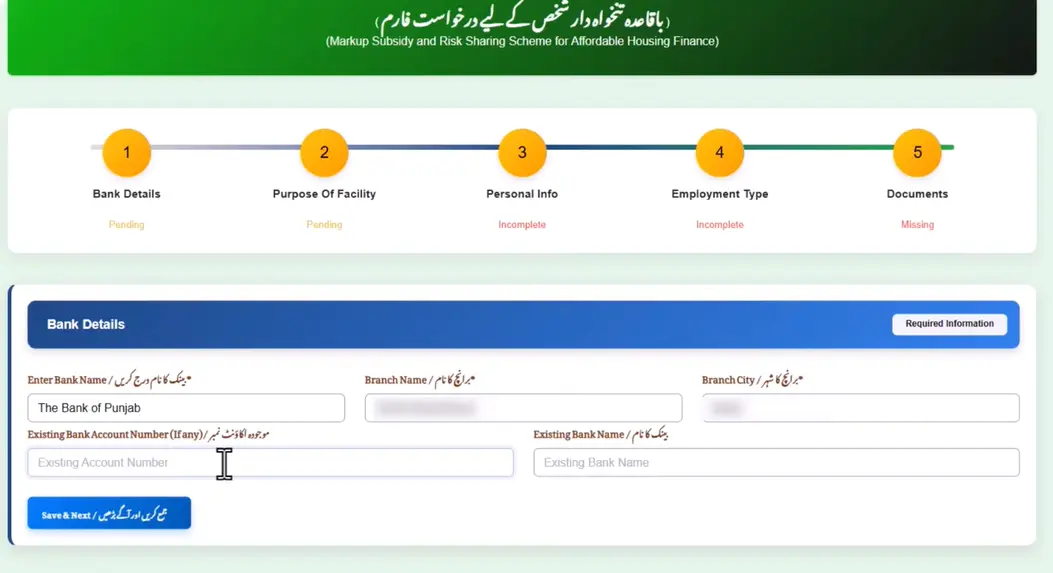
Step 6: Select your Preferred bank, branch, and city. If you already have a salary account or regular account in that bank, choose that one, it speeds up processing. Enter your bank account number (not the IBAN, just the account number). Save and continue.
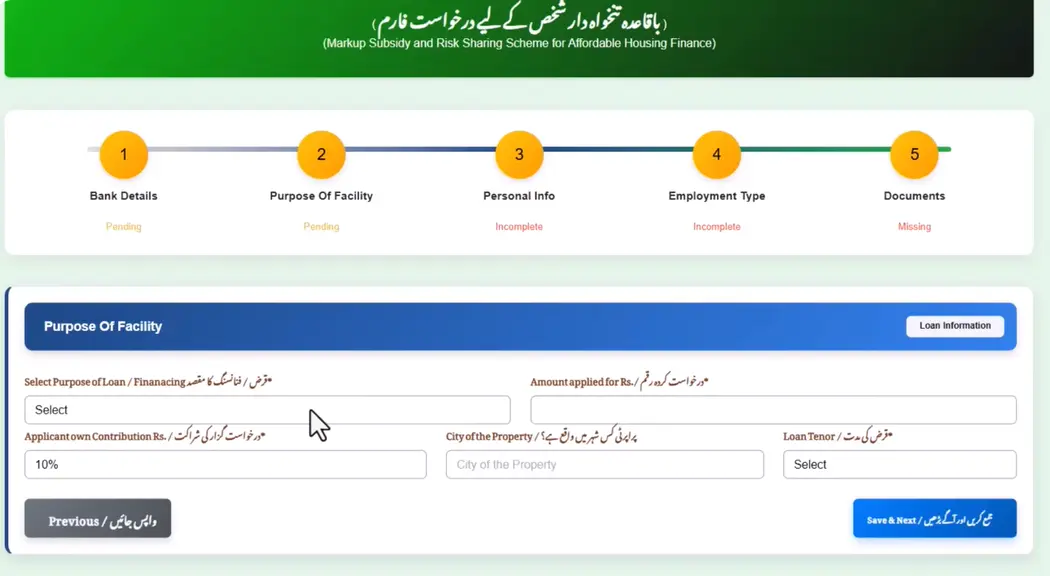
Step 7: Select what you want to do: Plot plus construction, buy a ready house or flat, or construction only. Then enter your desired loan amount. The minimum you must contribute yourself is 10%, but you can add more if you want.
Step 8: Enter your CNIC issue date, date of birth, mobile number, gender, father’s name and his CNIC, marital status, number of dependents, mother’s name, and your current residence status, whether you own it, rent it, or live with family. Then select your province, district, and full address.
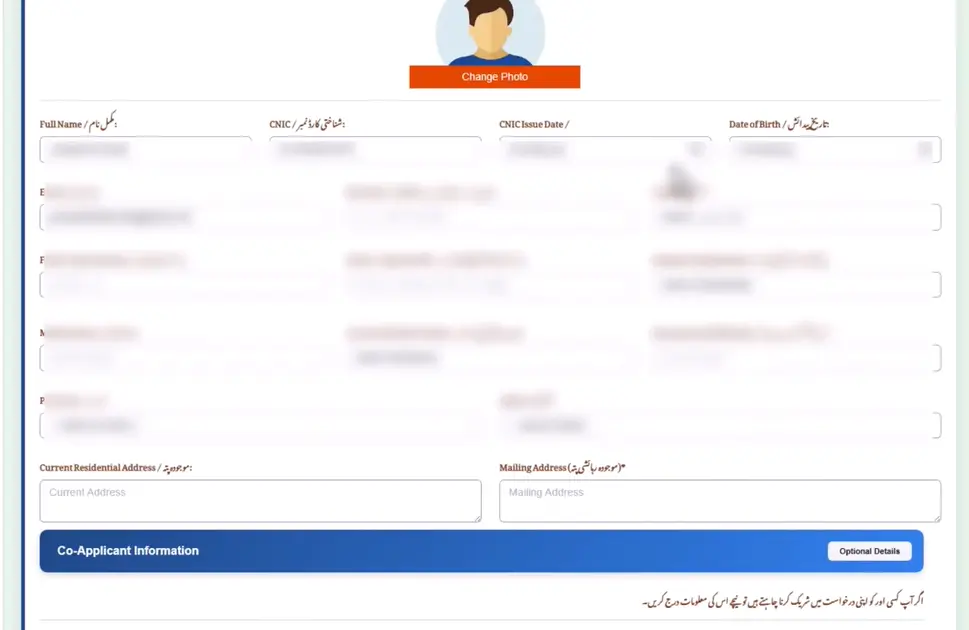
Step 9: If you are applying with a spouse or sibling as a co-applicant, enter their details here. If not, simply select “No.”
Step 10: Upload a clear, recent photograph of yourself and proceed.
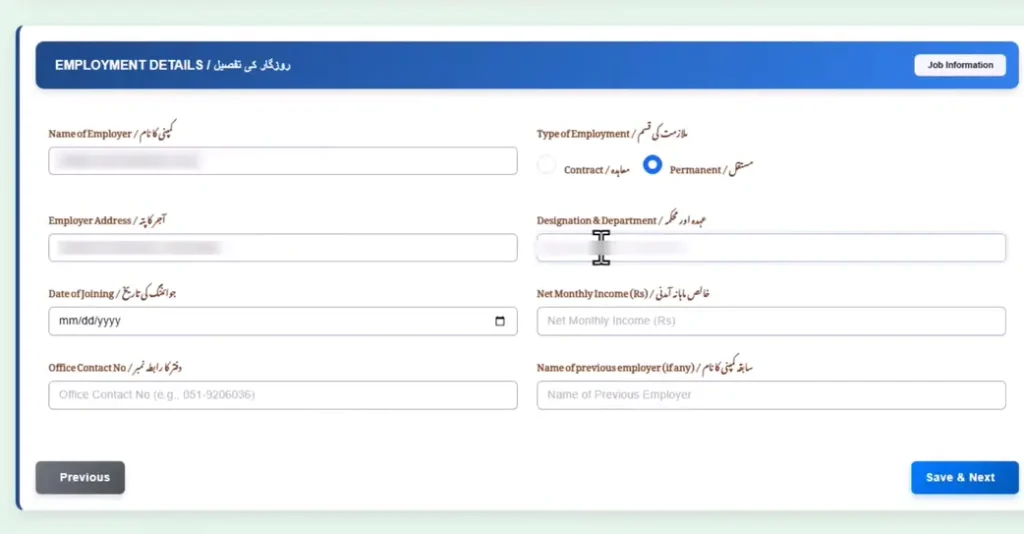
Step 11: Enter your employer’s name, job type (permanent or contractual), office address, your designation, joining date, net monthly income, and office contact number. You can also add previous employment details if applicable.
Step 12: Upload all required documents in PDF or JPG format. Make sure every file is clear and readable. Blurry or unclear documents will be rejected.
Step 13: Tick the declaration checkbox, review everything one more time, and press the Submit button. Write down or screenshot your application number, you will need it to track your status.
Read More: 8171 Registration 2026 Reopen- Comeplete Process for New Applicants in 2026
Documents Required
Incomplete documents are the number one reason applications get stuck. Prepare all of these before you start filling the form:
- CNIC – front and back
- Employment certificate from your employer
- Bank account maintenance certificate
- Next of kin’s CNIC
- Last 3 salary slips
- 6-month bank statement
- Your recent photograph
- Co-applicant’s CNIC (if applying with someone)
Tip: Scan everything as PDF or JPG and keep each file under 2MB. Use a proper scanner or a well-lit phone camera. Blurry photos or cut-off documents are rejected without any warning.
How Much Will You Pay Yourself? Loan Example Explained
A lot of people get confused about how much they need to contribute. Here is a simple example:
If you take a loan of 50 Lakh PKR:
- Your contribution (10%) = 5 Lakh PKR
- Government financing (90%) = 45 Lakh PKR
- Markup for first 10 years = 5% Fixed
- Markup for next 10 years = Bank’s rate at that time
- Loan period = Up to 20 years
- Processing fee = Zero
So basically, for a 50 lakh home, you only need to put in 5 lakh yourself. The rest comes from the government and the bank under this scheme. That is a genuinely good deal if you use it wisely.
Available Loan Amounts:
- 25 Lakh – for a small plot or basic construction
- 50 Lakh – for a standard 5 marla house or small flat
- 75 Lakh – for a medium-sized house or apartment
- 1 Crore – maximum limit, for a 10 marla house or larger flat
Which Banks Are Participating?
You get to choose your preferred bank. The following types of banks are included in the scheme:
- Commercial Banks – such as HBL, UBL, MCB, Allied Bank, and others
- Islamic Banks – such as Meezan Bank, Bank Islami, Dubai Islamic Bank
- Microfinance Banks – for those looking for smaller loan amounts
- House Building Finance Corporation (HBFC) – a dedicated housing finance institution
Smart Tip: Always choose the bank where you already have an account — especially your salary account. Your existing relationship with the bank improves your approval chances and makes the whole process faster.
Key Rules to Remember
- The loan is only for residential use, no commercial or business property allowed
- For the first 10 years, the markup is fixed at 5%
- After 10 years, the prevailing bank rate at that time will apply
- There is no prepayment penalty, you can pay extra anytime you want
- Each citizen can only apply once
- Your CNIC must be valid and up to date
- Property must be residential and up to 10 marla under this scheme
Frequently Asked Questions
What is the last date for Apna Ghar Scheme Online Registration?
The government has not officially announced a last date yet. Applications are open as long as the scheme is running.
Can freelancers and informal workers apply?
Yes, absolutely. The application form specifically includes an option for Informal or Freelance Income. You will need to show proof of income and a bank statement with regular transactions.
Can I buy a ready-made house instead of building one?
Yes. Three options are available, you can buy a plot and then construct, buy a finished house or flat, or take a loan just for construction on land you already own.
Is a joint application allowed?
Yes. You can apply with a spouse or sibling as a co-applicant. This means combined income is calculated, which can also increase your eligible loan amount.
How do I log back in to check my application?
Go to apnaghar.gov.pk, enter your CNIC number and password, fill in the security code, and press Sign In.
Final Word
Look, let us be honest, the PM Apna Ghar Program 2026 is a real opportunity for people whose dream of owning a home has been stuck because of money. A 5% markup, zero fees, 20-year tenure, and 90% government financing, this combination has never been this accessible in Pakistan before.
But one thing must be said clearly, only apply if you are genuinely eligible. Providing wrong information will not just get your application rejected, it can create serious problems for you later on. If you truly qualify, get your documents ready, open apnaghar.gov.pk, and follow every step as explained above. And please, do not give money to anyone. This scheme is completely free.
May Allah give everyone their own home. 🏡