

Are you struggling to face Wazir-e-Azam Apna Ghar Program Portal Login Issues? Many Pakistanis are facing frustrating login issues on apnaghar.gov.pk while trying to apply for their dream home under the Prime Minister’s housing scheme. From CNIC errors and password problems to “blocked by firewall” messages, these technical glitches are stopping thousands from moving forward.
In this complete 2026 guide, we bring you easy, step-by-step solutions to fix all common Wazir-e-Azam Apna Ghar Program Portal Login Issues. You will also learn the latest eligibility criteria, required documents, loan details from 25 lakh to 1 crore, and the exact process to register successfully. Don’t let login problems delay your dream, read on and solve it today!
Why Apna Ghar Scheme is a Game Changer in 2026
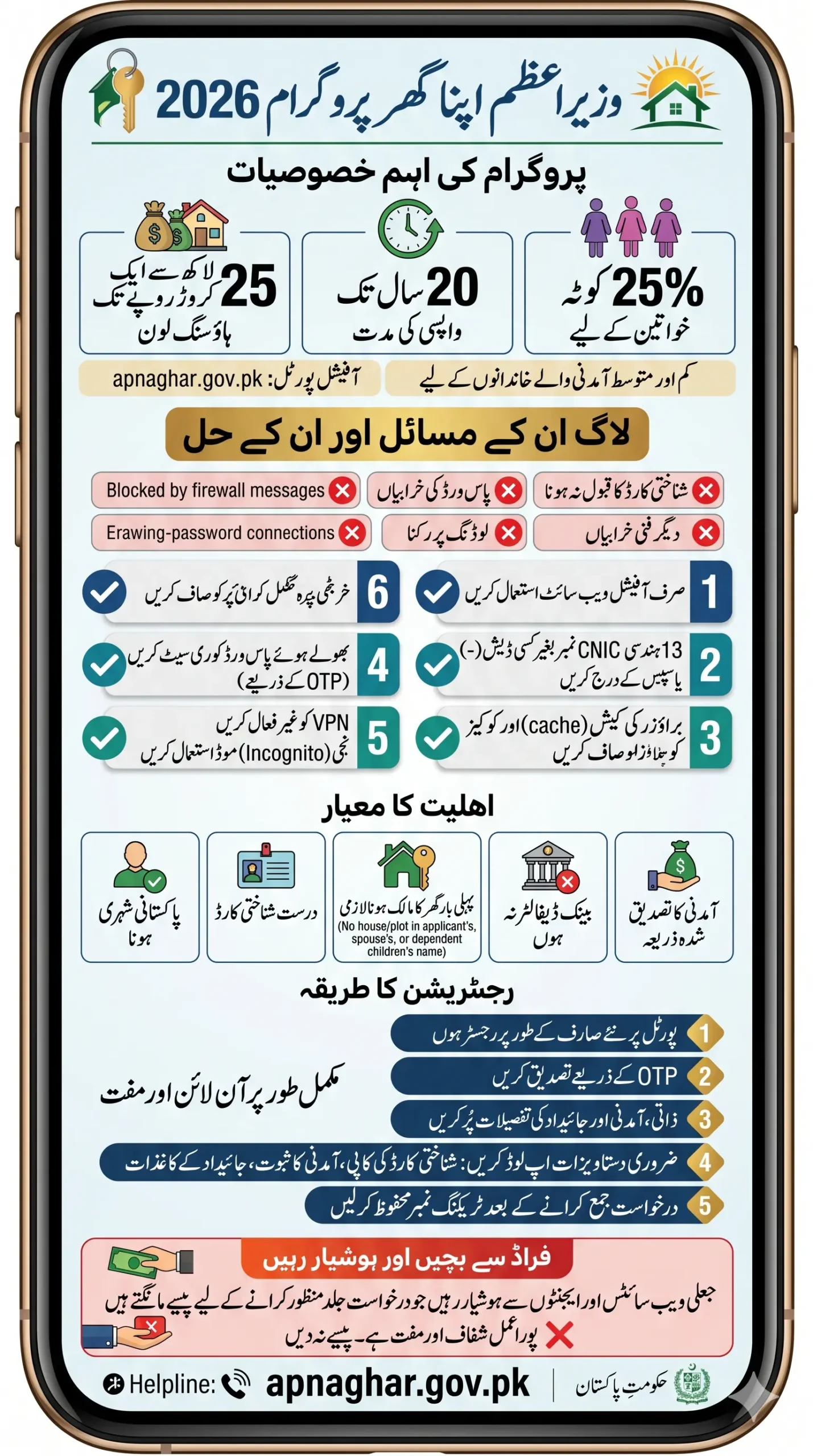
The Prime Minister’s Apna Ghar Program (Ghar Ho Tu Apna) is offering housing loans from PKR 2.5 million (25 lakh) to PKR 10 million (1 crore) for constructing or buying a house. The scheme is specially designed for low and middle-income families across Pakistan.
Key Benefits:
- Long repayment period up to 20 years
- Subsidized markup rates
- 25% of loans reserved especially for women
- Available in both urban and rural areas of Punjab, Sindh, KPK, Balochistan, and AJK
Also Read: Rehmat Card Web Portal 2026 – Complete Online Registration, Login & Eligibility Check Guide
Common Wazir-e-Azam Apna Ghar Program Portal Login Issues
Here are the most frequently reported login problems on the official portal:
- CNIC number not accepted
- Incorrect password error
- Forgot password loop
- Page not loading or stuck on loading screen
- “Blocked by firewall policy 439” message
- Portal not opening on mobile data
Step-by-Step Solutions for Apna Ghar Portal Login Issues
Follow these simple steps one by one to resolve your login problem:
1. Use the Correct Official Portal Make sure you are visiting the right website: https://apnaghar.gov.pk/login
Avoid third-party websites or fake links that appear on Google. Always type the URL manually or use the official government link.
2. Enter CNIC Correctly
- Use your 13-digit CNIC number without any dashes (-) or spaces.
- Example: 3520212345678 (not 35202-1234567-8)
3. Fix Password Problems If you have forgotten your password:
- Click on the “Forgot Password?” link on the login page.
- Enter your CNIC and registered mobile number.
- You will receive an OTP via SMS to reset your password.
4. Clear Browser Cache and Cookies Old cache often causes login failures.
- Go to your browser settings → Clear browsing data (Cache & Cookies).
- Recommended browsers: Google Chrome or Mozilla Firefox (latest versions).
5. Try These Quick Fixes
- Switch from mobile data to Wi-Fi (or vice versa)
- Use Incognito/Private browsing mode
- Disable VPN if you are using one
- Try logging in after some time if you see “blocked by firewall policy”
6. Update Your Mobile Number Your mobile number must be registered in your own name against your CNIC. Portal login and OTP verification depend on this.
Read More: PM Apna Ghar Program Online Apply 2026 – Complete Application & Loan Guide
Quick Information Table – Apna Ghar Scheme 2026
| Detail | Information |
|---|---|
| Official Portal | apnaghar.gov.pk |
| Loan Amount | 2.5 Million to 10 Million (25 Lakh – 1 Crore) |
| Repayment Period | Up to 20 Years |
| Target Group | Low & Middle-Income Families |
| Women Quota | 25% of total loans |
| Eligibility | Pakistani CNIC Holder, First-time Homeowner |
| Processing Fee | Small non-refundable fee (as applicable) |
Who Can Apply? Eligibility Criteria (Updated May 2026)
To successfully register on the Wazir-e-Azam Apna Ghar Program, you must meet these conditions:
- Must be a Pakistani citizen with a valid CNIC
- You, your spouse, or dependent children should not own any house or plot in Pakistan
- Clean credit history (no defaults in any bank – eCIB clear)
- Verifiable source of income (salaried or self-employed)
- Mobile number registered against your own CNIC
Required Documents:
- Scanned CNIC (front and back)
- Proof of income (salary slips, bank statement, or NTN)
- Property documents (if applying for construction/purchase)
Also Read: Rehmat Card OTP Not Received? Know The Real Reasons and Instant Fixes (2026 Guide)
How to Register on Apna Ghar Portal – Easy Steps
- Visit https://apnaghar.gov.pk
- Click on Register or New User
- Enter your CNIC, mobile number, and email
- Verify with OTP received on your mobile
- Fill in personal, income, and property details
- Upload required documents
- Select preferred bank and loan amount
- Submit the application and note down your tracking number
You can check your application status anytime by logging into the portal.
Pro Tips to Avoid Login Issues in Future
- Always use a strong password and save it safely
- Keep your CNIC and mobile number details updated
- Bookmark the official website
- Avoid logging in during peak hours (evenings) when traffic is high
- Keep a copy of all uploaded documents on your phone
Important Warning: Beware of fake websites and agents asking for money to “fast-track” your application. The entire process is free and online. Never share your CNIC details or OTP with anyone.
Still Facing Login Issues?
If none of the above solutions work, wait for 30–60 minutes and try again. Government portals sometimes face temporary technical glitches. You can also contact the helpline mentioned on the official portal or visit your nearest bank branch participating in the Apna Ghar Scheme.
Don’t lose hope, dost. Your dream home is closer than you think. Thousands of families have already started their journey through this program. Fix the login issue today and take the first step towards owning your own Apna Ghar.
Frequently Asked Questions
1. What is the official website for Wazir-e-Azam Apna Ghar Program?
The official portal is https://apnaghar.gov.pk. Always use this website and avoid any third-party or fake links.
2. Why am I unable to login to the Apna Ghar portal with my CNIC?
The most common reasons are entering CNIC with dashes, using an incorrect password, or an unregistered mobile number. Use 13 digits without dashes and make sure your mobile number is in your own name.
3. How much loan can I get under the Wazir-e-Azam Apna Ghar Scheme in 2026?
You can apply for a housing loan ranging from PKR 2.5 million (25 lakh) to PKR 10 million (1 crore) depending on your eligibility and requirements.
4. Is there any special quota for women in the Apna Ghar Program?
Yes, the government has reserved 25% of the total loans especially for women applicants to encourage female home ownership.
Final Words
Owning your own home is more than just a dream, it is a symbol of dignity, security, and a better future for your family. The Wazir-e-Azam Apna Ghar Program has opened the door for thousands of Pakistani families to turn this dream into reality with affordable housing loans up to 1 crore.
If you are facing any Wazir-e-Azam Apna Ghar Program Portal Login Issue, don’t get discouraged. Most problems can be solved with simple steps like using the correct portal, clearing cache, or resetting your password. Stay patient, follow the guide, and keep trying.
Your Apna Ghar is waiting for you. Take action today, complete your registration, and move one step closer to a secure and happy future. Best of luck!